SET FOREIGN_KEY_CHECKS=0;
-- reset customers
TRUNCATE customer_address_entity;
TRUNCATE customer_address_entity_datetime;
TRUNCATE customer_address_entity_decimal;
TRUNCATE customer_address_entity_int;
TRUNCATE customer_address_entity_text;
TRUNCATE customer_address_entity_varchar;
TRUNCATE customer_entity;
TRUNCATE customer_entity_datetime;
TRUNCATE customer_entity_decimal;
TRUNCATE customer_entity_int;
TRUNCATE customer_entity_text;
TRUNCATE customer_entity_varchar;
TRUNCATE log_customer;
TRUNCATE log_visitor;
TRUNCATE log_visitor_info;

ALTER TABLE customer_address_entity AUTO_INCREMENT=1;
ALTER TABLE customer_address_entity_datetime AUTO_INCREMENT=1;
ALTER TABLE customer_address_entity_decimal AUTO_INCREMENT=1;
ALTER TABLE customer_address_entity_int AUTO_INCREMENT=1;
ALTER TABLE customer_address_entity_text AUTO_INCREMENT=1;
ALTER TABLE customer_address_entity_varchar AUTO_INCREMENT=1;
ALTER TABLE customer_entity AUTO_INCREMENT=1;
ALTER TABLE customer_entity_datetime AUTO_INCREMENT=1;
ALTER TABLE customer_entity_decimal AUTO_INCREMENT=1;
ALTER TABLE customer_entity_int AUTO_INCREMENT=1;
ALTER TABLE customer_entity_text AUTO_INCREMENT=1;
ALTER TABLE customer_entity_varchar AUTO_INCREMENT=1;
ALTER TABLE log_customer AUTO_INCREMENT=1;
ALTER TABLE log_visitor AUTO_INCREMENT=1;
ALTER TABLE log_visitor_info AUTO_INCREMENT=1;
SET FOREIGN_KEY_CHECKS=1;
Thursday, 16 August 2012
delete all customer in magento


Remove all product in magento
TRUNCATE TABLE `catalog_product_bundle_option`;TRUNCATE TABLE `catalog_product_bundle_option_value`; TRUNCATE TABLE `catalog_product_bundle_selection`;TRUNCATE TABLE `catalog_product_entity_datetime`; TRUNCATE TABLE `catalog_product_entity_decimal`;TRUNCATE TABLE `catalog_product_entity_gallery`; TRUNCATE TABLE `catalog_product_entity_int`;TRUNCATE TABLE `catalog_product_entity_media_gallery`; TRUNCATE TABLE `catalog_product_entity_media_gallery_value`;TRUNCATE TABLE `catalog_product_entity_text`; TRUNCATE TABLE `catalog_product_entity_tier_price`;TRUNCATE TABLE `catalog_product_entity_varchar`; TRUNCATE TABLE `catalog_product_link`;TRUNCATE TABLE `catalog_product_link_attribute`; TRUNCATE TABLE `catalog_product_link_attribute_decimal`;TRUNCATE TABLE `catalog_product_link_attribute_int`; TRUNCATE TABLE `catalog_product_link_attribute_varchar`;TRUNCATE TABLE `catalog_product_link_type`; TRUNCATE TABLE `catalog_product_option`;TRUNCATE TABLE `catalog_product_option_price`;TRUNCATE TABLE `catalog_product_option_title`;TRUNCATE TABLE `catalog_product_option_type_price`;TRUNCATE TABLE `catalog_product_option_type_title`;TRUNCATE TABLE `catalog_product_option_type_value`; TRUNCATE TABLE `catalog_product_super_attribute`;TRUNCATE TABLE `catalog_product_super_attribute_label`;TRUNCATE TABLE `catalog_product_super_attribute_pricing`;TRUNCATE TABLE `catalog_product_super_link`; TRUNCATE TABLE `catalog_product_enabled_index`;TRUNCATE TABLE `catalog_product_website`; TRUNCATE TABLE `catalog_product_entity`;TRUNCATE TABLE `cataloginventory_stock`;TRUNCATE TABLE `cataloginventory_stock_item`; TRUNCATE TABLE `cataloginventory_stock_status`; insert into `catalog_product_link_type`(`link_type_id`,`code`) values (1,'relation'),(2,'bundle'),(3,'super'),(4,'up_sell'),(5,'cross_sell');insert into `catalog_product_link_attribute`(`product_link_attribute_id`,`link_type_id`,`product_link_attribute_code`,`data_type`) values (1,2,'qty','decimal'),(2,1,'position','int'),(3,4,'position','int'),(4,5,'position','int'),(6,1,'qty','decimal'),(7,3,'position','int'),(8,3,'qty','decimal'); insert into `cataloginventory_stock`(`stock_id`,`stock_name`) values (1,'Default');
Truncate all magento categories
TRUNCATE TABLE `catalog_category_entity`;TRUNCATE TABLE `catalog_category_entity_datetime`; TRUNCATE TABLE `catalog_category_entity_decimal`; TRUNCATE TABLE `catalog_category_entity_int`; TRUNCATE TABLE `catalog_category_entity_text`; TRUNCATE TABLE `catalog_category_entity_varchar`;TRUNCATE TABLE `catalog_category_product`;TRUNCATE TABLE `catalog_category_product_index`; insert into `catalog_category_entity`(`entity_id`,`entity_type_id`,`attribute_set_id`,`parent_id`,`created_at`,`updated_at`,`path`,`position`,`level`,`children_count`) values (1,3,0,0,'0000-00-00 00:00:00','2009-02-20 00:25:34','1',1,0,1),(2,3,3,0,'2009-02-20 00:25:34','2009-02-20 00:25:34','1/2',1,1,0); insert into `catalog_category_entity_int`(`value_id`,`entity_type_id`,`attribute_id`,`store_id`,`entity_id`,`value`) values (1,3,32,0,2,1),(2,3,32,1,2,1);insert into `catalog_category_entity_varchar`(`value_id`,`entity_type_id`,`attribute_id`,`store_id`,`entity_id`,`value`) values (1,3,31,0,1,'Root Catalog'),(2,3,33,0,1,'root-catalog'),(3,3,31,0,2,'Default Category'),(4,3,39,0,2,'PRODUCTS'),(5,3,33,0,2,'default-category');
Tuesday, 14 August 2012
How To Export and Import Category in Magento
For export category create a simple php file catgory.php in root Folder.
ini_set("memory_limit","1000M");
require_once "app/Mage.php";
umask(0);
Mage::app();
$category = Mage::getModel ( 'catalog/category' );
$tree = $category->getTreeModel ();
$tree->load();
$ids = $tree->getCollection()->getAllIds();
if ($ids) {
$string='';
$heading = '"store","categories","cat_id","is_active","meta_title","meta_keywords","meta_description","include_in_menu","is_anchor","description",';
foreach ($ids as $id) {
if($id>0)//start if removeroot category and default category .
{
$cate_cre = Mage::getModel('catalog/category');
$cate_cre->load($id);
$treeurl='';
$cate_cre1=Mage::getModel('catalog/category')->load($id);
$treeurl=$cate_cre->getName();
if($cate_cre1->getParentId()>0)
{
for($i=0; ;$i++)
{
if($cate_cre1->getParentId()>0)
{
$abc=Mage::getModel('catalog/category')->load($cate_cre1->getParentId());
$pCat=$abc->getName();
if($abc->getId()>1){
$treeurl=$pCat.'/'.$treeurl;
}
$cate_cre1=$abc;
}
else{
break;
}
}
}
$store = "default";
$string .='"'.$store.'","'.$treeurl.'","'.$id.'","'.$cate_cre->getIsActive().'","'.$cate_cre->getMetaTitle().'","'.$cate_cre->getMetaKeywords().'","'.$cate_cre->getMetaDescription().'","'.$cate_cre->getIncludeInMenu().'","'.$cate_cre->getIsAnchor().'","'.$cate_cre->getDescription().'"';
$string.="\n";
}//endof if removeroot category and default category .
}
$csv_output = $heading ."\n".$string;
$filename = "Categories";
header("Content-type: application/vnd.ms-excel");
header("Content-disposition: csv" . date("Y-m-d") . ".csv");
header( "Content-disposition: filename=".$filename.".csv");
print $csv_output;
}
?>
After run this file at browser .u got a csv file-
After the export category you must need to import the categories and you want to import the categories with previous category structure.For that work i craeted a folder ImpCat folder at app\code\local\
first i craete file at a file Category.php at app\code\local\ImpCat\Catalog\Model\Convert\Adaptera\
class ImpCat_Catalog_Model_Convert_Adapter_Category
extends Mage_Eav_Model_Convert_Adapter_Entity
{
protected $_categoryCache = array();
protected $_stores;
/**
* Category display modes
*/
protected $_displayModes = array( 'PRODUCTS', 'PAGE', 'PRODUCTS_AND_PAGE');
public function parse()
{
$batchModel = Mage::getSingleton('dataflow/batch');
/* @var $batchModel Mage_Dataflow_Model_Batch */
$batchImportModel = $batchModel->getBatchImportModel();
$importIds = $batchImportModel->getIdCollection();
foreach ($importIds as $importId) {
//print '
$batchImportModel->load($importId);
$importData = $batchImportModel->getBatchData();
$this->saveRow($importData);
}
}
/**
* Save category (import)
*
* @param array $importData
* @throws Mage_Core_Exception
* @return bool
*/
public function saveRow(array $importData)
{
if (empty($importData['store'])) {
if (!is_null($this->getBatchParams('store'))) {
$store = $this->getStoreById($this->getBatchParams('store'));
} else {
$message = Mage::helper('catalog')->__('Skip import row, required field "%s" not defined', 'store');
Mage::throwException($message);
}
} else {
$store = $this->getStoreByCode($importData['store']);
}
if ($store === false) {
$message = Mage::helper('catalog')->__('Skip import row, store "%s" field not exists', $importData['store']);
Mage::throwException($message);
}
$rootId = $store->getRootCategoryId();
if (!$rootId) {
return array();
}
$rootPath = '1/'.$rootId;
if (empty($this->_categoryCache[$store->getId()])) {
$collection = Mage::getModel('catalog/category')->getCollection()
->setStore($store)
->addAttributeToSelect('name');
$collection->getSelect()->where("path like '".$rootPath."/%'");
foreach ($collection as $cat) {
$pathArr = explode('/', $cat->getPath());
$namePath = '';
for ($i=2, $l=sizeof($pathArr); $i<$l; $i++) {
$name = $collection->getItemById($pathArr[$i])->getName();
$namePath .= (empty($namePath) ? '' : '/').trim($name);
}
$cat->setNamePath($namePath);
}
$cache = array();
foreach ($collection as $cat) {
$cache[strtolower($cat->getNamePath())] = $cat;
$cat->unsNamePath();
}
$this->_categoryCache[$store->getId()] = $cache;
}
$cache =& $this->_categoryCache[$store->getId()];
$importData['categories'] = preg_replace('#\s*/\s*#', '/', trim($importData['categories']));
if (!empty($cache[$importData['categories']])) {
return true;
}
$path = $rootPath;
$namePath = '';
$i = 1;
$categories = explode('/', $importData['categories']);
/*$IsActive = $importData['IsActive'];*/
$IsActive = $importData['is_active'];
$IsAnchor =$importData['is_anchor'];
$Description =$importData['description'];
$IncludeInMenu=$importData['include_in_menu'];
$MetaTitle=$importData['meta_title'];
$MetaKeywords=$importData['meta_keywords'];
$MetaDescription=$importData['meta_description'];
$Image=$importData['image'];
$URlkey=$importData['url_key'];
foreach ($categories as $catName) {
$namePath .= (empty($namePath) ? '' : '/').strtolower($catName);
if (empty($cache[$namePath])) {
$dispMode = $this->_displayModes[2];
$cat = Mage::getModel('catalog/category')
->setStoreId($store->getId())
->setPath($path)
->setName($catName)
->setIsActive($IsActive)
->setIsAnchor($IsAnchor)
->setDisplayMode($dispMode)->save();
$cat = Mage::getModel('catalog/category')->load($cat->getId());
$cat->setIncludeInMenu($IncludeInMenu);
$cat->setDescription($Description);
$cat->setMetaTitle($MetaTitle).
$cat->setMetaKeywords($MetaKeywords);
$cat->setMetaDescription($MetaDescription);
$cat->save();
$cat = Mage::getModel('catalog/category')->load($cat->getId());
$data['meta_keywords']=$MetaKeywords;
$data['meta_title']=$MetaTitle;
$data['meta_keywords']=$MetaKeywords;
$data['meta_description']=$MetaDescription;
$data['url_key']= $URlkey;
$cat->addData($data);
$cat->save();
$cache[$namePath] = $cat;
}
$catId = $cache[$namePath]->getId();
$path .= '/'.$catId;
$i++;
}
return true;
}
/**
* Retrieve store object by code
*
* @param string $store
* @return Mage_Core_Model_Store
*/
public function getStoreByCode($store)
{
$this->_initStores();
if (isset($this->_stores[$store])) {
return $this->_stores[$store];
}
return false;
}
/**
* Init stores
*
* @param none
* @return void
*/
protected function _initStores ()
{
if (is_null($this->_stores)) {
$this->_stores = Mage::app()->getStores(true, true);
foreach ($this->_stores as $code => $store) {
$this->_storesIdCode[$store->getId()] = $code;
}
}
}
}
?>
There for need config.xml file for configuration placed at app\code\local\ImpCat\Catalog\etc\ -
ImpCat_Catalog_Model_Convert_Adapter_Category
Now craete module controller file ImpCat_All.xml at app\etc\modules-
local
true
then, create a dataflow advanced profile into -admin/system/Import Export/Dataflow Advanced Profile and give the Profile Name is 'category import'and
its Actions XML is-
file
var/import
<![CDATA[Categories.csv]]>
<![CDATA[csv]]>
<![CDATA[,]]>
<![CDATA["]]>
true
<![CDATA[0]]>
1
<![CDATA[.]]>
catalog/convert_adapter_category
parse
after create import categoryextension you goes to admin system->permission->roles->Administrators ->Role Users
click on Save Role.Then Flush magento Cache.
Then downloaded Categories.csv put Categories.csv into var/import/
and removed cat_id colums from csv and
remove first two rows
and remove all Default Category/ from categories colunn in Categories.csv.
Now you go to again- admin/system/Import Export/Dataflow Advanced Profile run 'category import' profile>Run Profile>click 'Run Profile in Popup' import of category now start and automatically created category. Now you fill happy.Click here to download
click for csv
http://www.bluehorse.in/Uploads/cat.rar
and click for extension http://www.bluehorse.in/Uploads/ImpCat_All.rar
and
http://www.bluehorse.in/Uploads/ImpCat.rar
ini_set("memory_limit","1000M");
require_once "app/Mage.php";
umask(0);
Mage::app();
$category = Mage::getModel ( 'catalog/category' );
$tree = $category->getTreeModel ();
$tree->load();
$ids = $tree->getCollection()->getAllIds();
if ($ids) {
$string='';
$heading = '"store","categories","cat_id","is_active","meta_title","meta_keywords","meta_description","include_in_menu","is_anchor","description",';
foreach ($ids as $id) {
if($id>0)//start if removeroot category and default category .
{
$cate_cre = Mage::getModel('catalog/category');
$cate_cre->load($id);
$treeurl='';
$cate_cre1=Mage::getModel('catalog/category')->load($id);
$treeurl=$cate_cre->getName();
if($cate_cre1->getParentId()>0)
{
for($i=0; ;$i++)
{
if($cate_cre1->getParentId()>0)
{
$abc=Mage::getModel('catalog/category')->load($cate_cre1->getParentId());
$pCat=$abc->getName();
if($abc->getId()>1){
$treeurl=$pCat.'/'.$treeurl;
}
$cate_cre1=$abc;
}
else{
break;
}
}
}
$store = "default";
$string .='"'.$store.'","'.$treeurl.'","'.$id.'","'.$cate_cre->getIsActive().'","'.$cate_cre->getMetaTitle().'","'.$cate_cre->getMetaKeywords().'","'.$cate_cre->getMetaDescription().'","'.$cate_cre->getIncludeInMenu().'","'.$cate_cre->getIsAnchor().'","'.$cate_cre->getDescription().'"';
$string.="\n";
}//endof if removeroot category and default category .
}
$csv_output = $heading ."\n".$string;
$filename = "Categories";
header("Content-type: application/vnd.ms-excel");
header("Content-disposition: csv" . date("Y-m-d") . ".csv");
header( "Content-disposition: filename=".$filename.".csv");
print $csv_output;
}
?>
After run this file at browser .u got a csv file-
After the export category you must need to import the categories and you want to import the categories with previous category structure.For that work i craeted a folder ImpCat folder at app\code\local\
first i craete file at a file Category.php at app\code\local\ImpCat\Catalog\Model\Convert\Adaptera\
class ImpCat_Catalog_Model_Convert_Adapter_Category
extends Mage_Eav_Model_Convert_Adapter_Entity
{
protected $_categoryCache = array();
protected $_stores;
/**
* Category display modes
*/
protected $_displayModes = array( 'PRODUCTS', 'PAGE', 'PRODUCTS_AND_PAGE');
public function parse()
{
$batchModel = Mage::getSingleton('dataflow/batch');
/* @var $batchModel Mage_Dataflow_Model_Batch */
$batchImportModel = $batchModel->getBatchImportModel();
$importIds = $batchImportModel->getIdCollection();
foreach ($importIds as $importId) {
//print '
'.memory_get_usage().'';
$batchImportModel->load($importId);
$importData = $batchImportModel->getBatchData();
$this->saveRow($importData);
}
}
/**
* Save category (import)
*
* @param array $importData
* @throws Mage_Core_Exception
* @return bool
*/
public function saveRow(array $importData)
{
if (empty($importData['store'])) {
if (!is_null($this->getBatchParams('store'))) {
$store = $this->getStoreById($this->getBatchParams('store'));
} else {
$message = Mage::helper('catalog')->__('Skip import row, required field "%s" not defined', 'store');
Mage::throwException($message);
}
} else {
$store = $this->getStoreByCode($importData['store']);
}
if ($store === false) {
$message = Mage::helper('catalog')->__('Skip import row, store "%s" field not exists', $importData['store']);
Mage::throwException($message);
}
$rootId = $store->getRootCategoryId();
if (!$rootId) {
return array();
}
$rootPath = '1/'.$rootId;
if (empty($this->_categoryCache[$store->getId()])) {
$collection = Mage::getModel('catalog/category')->getCollection()
->setStore($store)
->addAttributeToSelect('name');
$collection->getSelect()->where("path like '".$rootPath."/%'");
foreach ($collection as $cat) {
$pathArr = explode('/', $cat->getPath());
$namePath = '';
for ($i=2, $l=sizeof($pathArr); $i<$l; $i++) {
$name = $collection->getItemById($pathArr[$i])->getName();
$namePath .= (empty($namePath) ? '' : '/').trim($name);
}
$cat->setNamePath($namePath);
}
$cache = array();
foreach ($collection as $cat) {
$cache[strtolower($cat->getNamePath())] = $cat;
$cat->unsNamePath();
}
$this->_categoryCache[$store->getId()] = $cache;
}
$cache =& $this->_categoryCache[$store->getId()];
$importData['categories'] = preg_replace('#\s*/\s*#', '/', trim($importData['categories']));
if (!empty($cache[$importData['categories']])) {
return true;
}
$path = $rootPath;
$namePath = '';
$i = 1;
$categories = explode('/', $importData['categories']);
/*$IsActive = $importData['IsActive'];*/
$IsActive = $importData['is_active'];
$IsAnchor =$importData['is_anchor'];
$Description =$importData['description'];
$IncludeInMenu=$importData['include_in_menu'];
$MetaTitle=$importData['meta_title'];
$MetaKeywords=$importData['meta_keywords'];
$MetaDescription=$importData['meta_description'];
$Image=$importData['image'];
$URlkey=$importData['url_key'];
foreach ($categories as $catName) {
$namePath .= (empty($namePath) ? '' : '/').strtolower($catName);
if (empty($cache[$namePath])) {
$dispMode = $this->_displayModes[2];
$cat = Mage::getModel('catalog/category')
->setStoreId($store->getId())
->setPath($path)
->setName($catName)
->setIsActive($IsActive)
->setIsAnchor($IsAnchor)
->setDisplayMode($dispMode)->save();
$cat = Mage::getModel('catalog/category')->load($cat->getId());
$cat->setIncludeInMenu($IncludeInMenu);
$cat->setDescription($Description);
$cat->setMetaTitle($MetaTitle).
$cat->setMetaKeywords($MetaKeywords);
$cat->setMetaDescription($MetaDescription);
$cat->save();
$cat = Mage::getModel('catalog/category')->load($cat->getId());
$data['meta_keywords']=$MetaKeywords;
$data['meta_title']=$MetaTitle;
$data['meta_keywords']=$MetaKeywords;
$data['meta_description']=$MetaDescription;
$data['url_key']= $URlkey;
$cat->addData($data);
$cat->save();
$cache[$namePath] = $cat;
}
$catId = $cache[$namePath]->getId();
$path .= '/'.$catId;
$i++;
}
return true;
}
/**
* Retrieve store object by code
*
* @param string $store
* @return Mage_Core_Model_Store
*/
public function getStoreByCode($store)
{
$this->_initStores();
if (isset($this->_stores[$store])) {
return $this->_stores[$store];
}
return false;
}
/**
* Init stores
*
* @param none
* @return void
*/
protected function _initStores ()
{
if (is_null($this->_stores)) {
$this->_stores = Mage::app()->getStores(true, true);
foreach ($this->_stores as $code => $store) {
$this->_storesIdCode[$store->getId()] = $code;
}
}
}
}
?>
There for need config.xml file for configuration placed at app\code\local\ImpCat\Catalog\etc\ -
Now craete module controller file ImpCat_All.xml at app\etc\modules-
then, create a dataflow advanced profile into -admin/system/Import Export/Dataflow Advanced Profile and give the Profile Name is 'category import'and
its Actions XML is-
file
var/import
<![CDATA[Categories.csv]]>
<![CDATA[csv]]>
<![CDATA[,]]>
<![CDATA["]]>
true
<![CDATA[0]]>
1
<![CDATA[.]]>
catalog/convert_adapter_category
parse
after create import categoryextension you goes to admin system->permission->roles->Administrators ->Role Users
click on Save Role.Then Flush magento Cache.
Then downloaded Categories.csv put Categories.csv into var/import/
and removed cat_id colums from csv and
remove first two rows
and remove all Default Category/ from categories colunn in Categories.csv.
Now you go to again- admin/system/Import Export/Dataflow Advanced Profile run 'category import' profile>Run Profile>click 'Run Profile in Popup' import of category now start and automatically created category. Now you fill happy.Click here to download
click for csv
http://www.bluehorse.in/Uploads/cat.rar
and click for extension http://www.bluehorse.in/Uploads/ImpCat_All.rar
and
http://www.bluehorse.in/Uploads/ImpCat.rar
How to Call Newsletter in footer in Magento
To show Newsletter in footer go to
and add the following line in
app/design/frontend/default/YourTheme/layout/newsletter.xml and add the following lines in default<reference name="footer"> <block type="newsletter/subscribe" name="footer.newsletter"
template="newsletter/subscribe.phtml"/>
  </reference>
and add the following line in
app/design/frontend/default/YourTheme/template/page/html/footer.phtml echo $this->getChildHtml('footer.newsletter'); ?>
Onepage Checkout - Remove login in magnto
Onepage Checkout - Remove login in magnto
2: Create local.xml
- <?xml version="1.0"?>
version ="0.1.0">
<!
-- Complete process of removing steps is defined here:
http://www.magentocommerce.com/wiki/5_-_modules_and_development/checkout/customizing_onepage_checkout_-_remove_shipping_method
-->
</reference>
</checkout_onepage_index>
</layout>
3.) /app/design/frontend/default/default/template/checkout/onepage.phtml
- type="hidden" name="checkout_method" id="login:guest" checked="checked" value="guest"/>
How to add Currency selector to Magento’s header
How to add Currency selector to Magento’s header
Now, perhaps you’ve noticed that in Magento’s Administration under
“System->Configuration” menu, you have “Currency Setup” tab. There
You should select default site currency, and besides that, all
currencies you wish to support.
Here’s a screenshot of how it looks:

After that you should go to menu item under “System->Manage Currency Rates”. And set rates between values you’ve chosen before. And here’s how it looks like:

And now, after you’re done with initial setup, let’s go with modifications to make output in header happen. First thing you should do is to create new template file and put it here
Next thing you need to do is to display this custom currency template inside header. I’ve inserted one line inside “YOUR_PACKAGE/YOUR_THEME/layout/page.xml” as follows (as base for this article I’ve used Magento CE “Modern” theme):
Here’s a screenshot of how it looks:
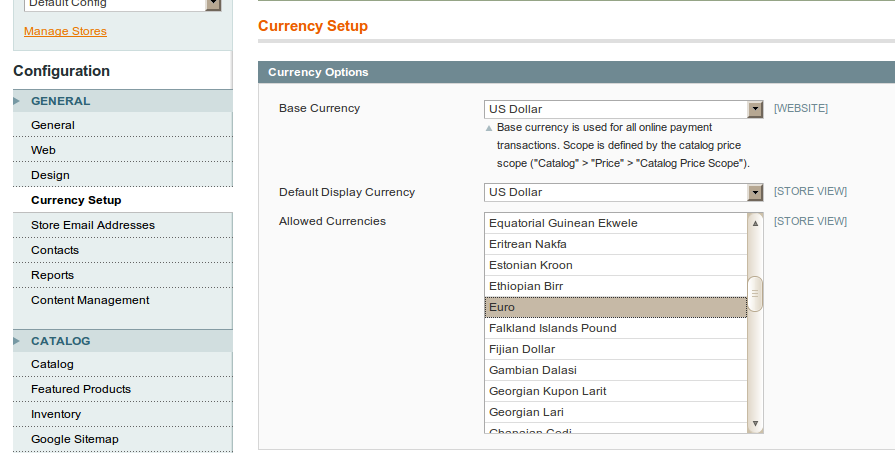
After that you should go to menu item under “System->Manage Currency Rates”. And set rates between values you’ve chosen before. And here’s how it looks like:
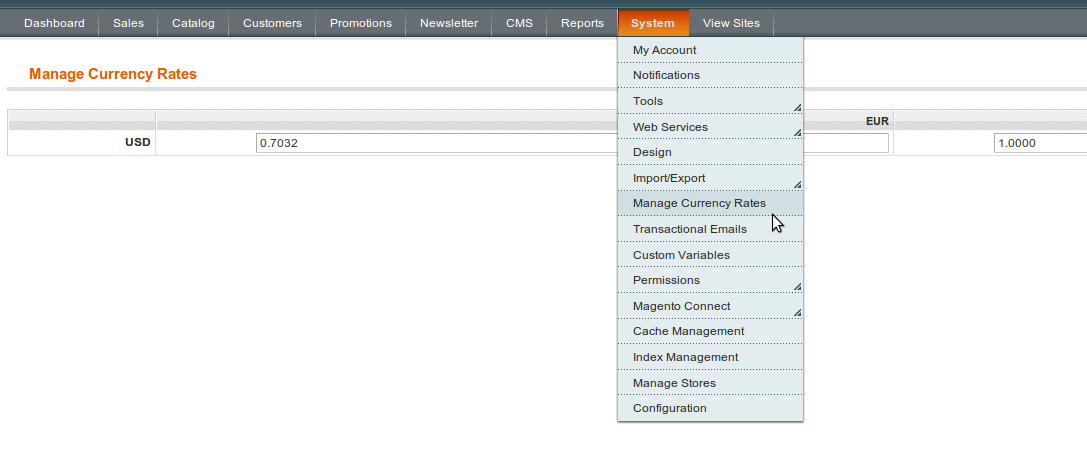
And now, after you’re done with initial setup, let’s go with modifications to make output in header happen. First thing you should do is to create new template file and put it here
Next thing you need to do is to display this custom currency template inside header. I’ve inserted one line inside “YOUR_PACKAGE/YOUR_THEME/layout/page.xml” as follows (as base for this article I’ve used Magento CE “Modern” theme):
<block type="directory/currency" name="store_currency_selector" as="store_currency_selector" template="directory/currency.phtml"/>
And finally there’s one more thing you need to do to inject our custom
template so you can see it on frontend, Open
“YOUR_PACKAGE/YOUR_THEME/template/page/html/header.phtml” (or create new
file if there’s none there) and add yet another line
echo $this->getChildHtml('store_currency_selector') ?>
how to add css and js in magento
first put your css and js in your project and and path is:-
skin\frontend\default\default in css folder paste your css and make js folder this path and paste your js
and after call in head.phtml
open this path app\design\frontend\base\default\template\page\html\head.phtml
and and of the page in head.phtml
css link:-
js link:-
skin\frontend\default\default in css folder paste your css and make js folder this path and paste your js
and after call in head.phtml
open this path app\design\frontend\base\default\template\page\html\head.phtml
and and of the page in head.phtml
css link:-
js link:-
how to show new products on homepage magento
New products:-
Go to “CMS - Manage Pages” and select “Home Page” from the list of pages.Use this code snippet to show products labeled as “new” on your front page:
{{block type="catalog/product_new" name="home.catalog.product.new" alias="product_homepage" template="catalog/product/new.phtml"}}
All Products:-
Go to “CMS - Manage Pages” and select “Home Page” from the list of pages.Use this code snippet to show all products in your catalog on your front page
{{block type="catalog/product_list" name="home.catalog.product.list" alias="products_homepage" template="catalog/product/list.phtml"}}
All Products from one Category:-
Go to “CMS - Manage Pages” and select “Home Page” from the list of pages.Use this code snippet to show one category on your front page
{{block type="catalog/product_list" name="home.catalog.product.list" alias="products_homepage" category_id="4" template="catalog/product/list.phtml"}}
Add a contact form to a Magento CMS page
Of all Magento tips, this one solve a very frequent problem. Your
clients will want to get a contact form to which they can add bits of
text, they’ll also want to have the breadcrumb menu shown for that
contact page. Out of the box, the Magento contact form doesn’t allo
this, to do it you just have to follow this procedure.
Go to your CMS> Manage Pages interface
Once there, input your HTML as you normally would on any other page
Once you are happy with HTML part, add this lines
Go to your CMS> Manage Pages interface
Once there, input your HTML as you normally would on any other page
Once you are happy with HTML part, add this lines
<!– CONTACT FORM –>
{{block type="core/template" name="contactForm"
 form_action="/contacts/index/post" template="contacts/form.phtml"}}
<!– END OF CONTACT FORM –>
How to add a extra field “Contact Us” form in magento
Step One: Modify the (interface)/(theme)/template/contacts/form.phtml file.
Say we would like to add a field called ‘Test’ in between e-mail and telephone on the default field.
="input-box">
Say we would like to add a field called ‘Test’ in between e-mail and telephone on the default field.
- class
<input name="email" id="email" title="__('Email') ?>" value="htmlEscape($this->helper('contacts')->getUserEmail()) ?>" class="required-entry input-text validate-email" type="text"/>
class
class
<input name="telephone" id="telephone" title="__('Telephone') ?>" value="" class="input-text" type="text"/>
Here is the new field:
- class
<input name="email" id="email" title="__('Email') ?>" value="htmlEscape($this->helper('contacts')->getUserEmail()) ?>" class="required-entry input-text validate-email" type="text"/>
class
class
<input name="test" id="test" title="__('Test') ?>" value="" class="input-text" type="text"/>
class
<input name="telephone" id="telephone" title="__('Telephone') ?>" value="" class="input-text" type="text"/>
Step Two: Create the new Transactional E-Mail form.
1) Go to System→Transactional E-mails in the Magento Admin section. 2) Click ‘Add New Template’ 3) From the ‘Template’ dropdown box select ‘Contact Form’ 4) Click ‘Load Template’ 5) Under template content you will see:
1) Go to System→Transactional E-mails in the Magento Admin section. 2) Click ‘Add New Template’ 3) From the ‘Template’ dropdown box select ‘Contact Form’ 4) Click ‘Load Template’ 5) Under template content you will see:
- Name: {{var data.name}}
- E-mail: {{var data.email}}
- Telephone: {{var data.telephone}}
- Comment: {{var data.comment}}Add your new field in between E-mail and Telephone:
- Name: {{var data.name}}
- E-mail: {{var data.email}}
- Test: {{var data.test}}
- Telephone: {{var data.telephone}}
- Comment: {{var data.comment}}
Delete all Products and ResetProduct id’s in Magento
Delete all Products and ResetProduct id’s in Magento
TRUNCATE TABLE `catalog_product_bundle_option`; TRUNCATE TABLE `catalog_product_bundle_option_value`; TRUNCATE TABLE `catalog_product_bundle_selection`; TRUNCATE TABLE `catalog_product_entity_datetime`;TRUNCATE TABLE `catalog_product_entity_decimal`;TRUNCATE TABLE `catalog_product_entity_gallery`; TRUNCATE TABLE `catalog_product_entity_int`;TRUNCATE TABLE `catalog_product_entity_media_gallery`;TRUNCATE TABLE `catalog_product_entity_media_gallery_value`;TRUNCATE TABLE `catalog_product_entity_text`;TRUNCATE TABLE `catalog_product_entity_tier_price`; TRUNCATE TABLE `catalog_product_entity_varchar`;TRUNCATE TABLE `catalog_product_link`; TRUNCATE TABLE `catalog_product_link_attribute`;TRUNCATE TABLE `catalog_product_link_attribute_decimal`; TRUNCATE TABLE `catalog_product_link_attribute_int`; TRUNCATE TABLE `catalog_product_link_attribute_varchar`; TRUNCATE TABLE `catalog_product_link_type`; TRUNCATE TABLE `catalog_product_option`; TRUNCATE TABLE `catalog_product_option_price`; TRUNCATE TABLE `catalog_product_option_title`; TRUNCATE TABLE `catalog_product_option_type_price`;TRUNCATE TABLE `catalog_product_option_type_title`; TRUNCATE TABLE `catalog_product_option_type_value`;TRUNCATE TABLE `catalog_product_super_attribute`;TRUNCATE TABLE `catalog_product_super_attribute_label`;TRUNCATE TABLE `catalog_product_super_attribute_pricing`;TRUNCATE TABLE `catalog_product_super_link`; TRUNCATE TABLE `catalog_product_enabled_index`; TRUNCATE TABLE `catalog_product_website`;TRUNCATE TABLE `catalog_product_entity`; TRUNCATE TABLE `cataloginventory_stock`;TRUNCATE TABLE `cataloginventory_stock_item`;TRUNCATE TABLE `cataloginventory_stock_status`;insert into `catalog_product_link_type`(`link_type_id`,`code`) values (1,'relation'),(2,'bundle'),(3,'super'),(4,'up_sell'),(5,'cross_sell'); insert into `catalog_product_link_attribute`(`product_link_attribute_id`,`link_type_id`,`product_link_attribute_code`,`data_type`) values (1,2,'qty','decimal'),(2,1,'position','int'),(3,4,'position','int'),(4,5,'position','int'),(6,1,'qty','decimal'),(7,3,'position','int'),(8,3,'qty','decimal'); insert into `cataloginventory_stock`(`stock_id`,`stock_name`) values (1,'Default');
Probably should also clear/refresh/disable cache from System > Cache
Management. I also like to delete everything under my ./var directory as
well just to be doubly sure its all clear.
Delete Orders From Magento and Reset The Order Id
Delete Orders From Magento and Reset The Order Id
1. Take the backup of your current database
2. Run the below queries
3. I have not fully tested that what will be the effect of these queries on the database, but as much i tested it does not have any negative effect on the Magento Database
4. If you find any wrong effect then your comment are welcome
These are the queries to delete the orders on the magento and reset the Id
—————————————————————-
2. Run the below queries
3. I have not fully tested that what will be the effect of these queries on the database, but as much i tested it does not have any negative effect on the Magento Database
4. If you find any wrong effect then your comment are welcome
These are the queries to delete the orders on the magento and reset the Id
—————————————————————-
SET FOREIGN_KEY_CHECKS=0;

TRUNCATE `sales_flat_order`;
TRUNCATE `sales_flat_order_address`;
TRUNCATE `sales_flat_order_grid`;
TRUNCATE `sales_flat_order_item`;
TRUNCATE `sales_flat_order_payment`;
TRUNCATE `sales_flat_order_status_history`;

TRUNCATE `sales_flat_creditmemo`;
TRUNCATE `sales_flat_creditmemo_comment`;
TRUNCATE `sales_flat_creditmemo_grid`;
TRUNCATE `sales_flat_creditmemo_item`;

TRUNCATE `sales_flat_invoice`;
TRUNCATE `sales_flat_invoice`;
TRUNCATE `sales_flat_invoice_grid`;
TRUNCATE `sales_flat_invoice_item`;

TRUNCATE `sales_flat_quote`;
TRUNCATE `sales_flat_quote_address`;
TRUNCATE `sales_flat_quote_address_item`;
TRUNCATE `sales_flat_quote_item`;
TRUNCATE `sales_flat_quote_item_option`;
TRUNCATE `sales_flat_order_item`;

TRUNCATE `sales_flat_shipment`;
TRUNCATE `sales_flat_shipment_comment`;
TRUNCATE `sales_flat_shipment_grid`;
TRUNCATE `sales_flat_shipment_item`;
TRUNCATE `sales_flat_shipment_item`;
TRUNCATE `sales_flat_shipment_track`;

TRUNCATE `sendfriend_log`;
TRUNCATE `tag`;
TRUNCATE `tag_relation`;
TRUNCATE `tag_summary`;
TRUNCATE `wishlist`;
TRUNCATE `log_quote`;
TRUNCATE `report_event`;

ALTER TABLE `sales_flat_order` AUTO_INCREMENT=0;
ALTER TABLE `sales_flat_order_address` AUTO_INCREMENT=0;
ALTER TABLE `sales_flat_order_grid` AUTO_INCREMENT=0;
ALTER TABLE `sales_flat_order_item` AUTO_INCREMENT=0;
ALTER TABLE `sales_flat_order_payment` AUTO_INCREMENT=0;
ALTER TABLE `sales_flat_order_status_history` AUTO_INCREMENT=0;

ALTER TABLE `sales_flat_creditmemo` AUTO_INCREMENT=0;
ALTER TABLE `sales_flat_creditmemo_comment` AUTO_INCREMENT=0;
ALTER TABLE `sales_flat_creditmemo_grid` AUTO_INCREMENT=0;
ALTER TABLE `sales_flat_creditmemo_item` AUTO_INCREMENT=0;

ALTER TABLE `sales_flat_invoice` AUTO_INCREMENT=0;
ALTER TABLE `sales_flat_invoice` AUTO_INCREMENT=0;
ALTER TABLE `sales_flat_invoice_grid` AUTO_INCREMENT=0;
ALTER TABLE `sales_flat_invoice_item` AUTO_INCREMENT=0;

ALTER TABLE `sales_flat_quote` AUTO_INCREMENT=0;
ALTER TABLE `sales_flat_quote_address` AUTO_INCREMENT=0;
ALTER TABLE `sales_flat_quote_address_item` AUTO_INCREMENT=0;
ALTER TABLE `sales_flat_quote_item` AUTO_INCREMENT=0;
ALTER TABLE `sales_flat_quote_item_option` AUTO_INCREMENT=0;
ALTER TABLE `sales_flat_order_item` AUTO_INCREMENT=0;

ALTER TABLE `sales_flat_shipment` AUTO_INCREMENT=0;
ALTER TABLE `sales_flat_shipment_comment` AUTO_INCREMENT=0;
ALTER TABLE `sales_flat_shipment_grid` AUTO_INCREMENT=0;
ALTER TABLE `sales_flat_shipment_item` AUTO_INCREMENT=0;
ALTER TABLE `sales_flat_shipment_item` AUTO_INCREMENT=0;
ALTER TABLE `sales_flat_shipment_track` AUTO_INCREMENT=0;

ALTER TABLE `sendfriend_log` AUTO_INCREMENT=0;
ALTER TABLE `tag` AUTO_INCREMENT=0;
ALTER TABLE `tag_relation` AUTO_INCREMENT=0;
ALTER TABLE `tag_summary` AUTO_INCREMENT=0;
ALTER TABLE `wishlist` AUTO_INCREMENT=0;
ALTER TABLE `log_quote` AUTO_INCREMENT=0;
ALTER TABLE `report_event` AUTO_INCREMENT=0;

TRUNCATE `eav_entity_store`;
ALTER TABLE  `eav_entity_store` AUTO_INCREMENT=0;

SET FOREIGN_KEY_CHECKS=1;
Subscribe to:
Posts (Atom)