How to add Currency selector to Magento’s header
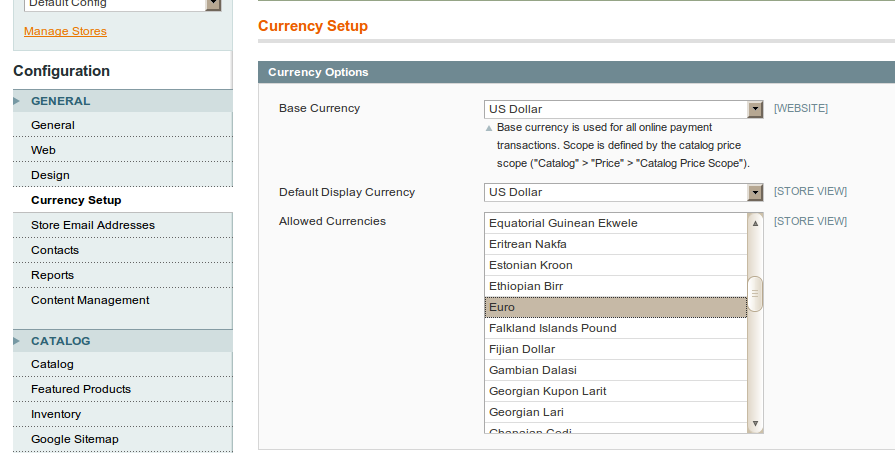
Now, perhaps you’ve noticed that in Magento’s Administration under
“System->Configuration” menu, you have “Currency Setup” tab. There
You should select default site currency, and besides that, all
currencies you wish to support.
Here’s a screenshot of how it looks:

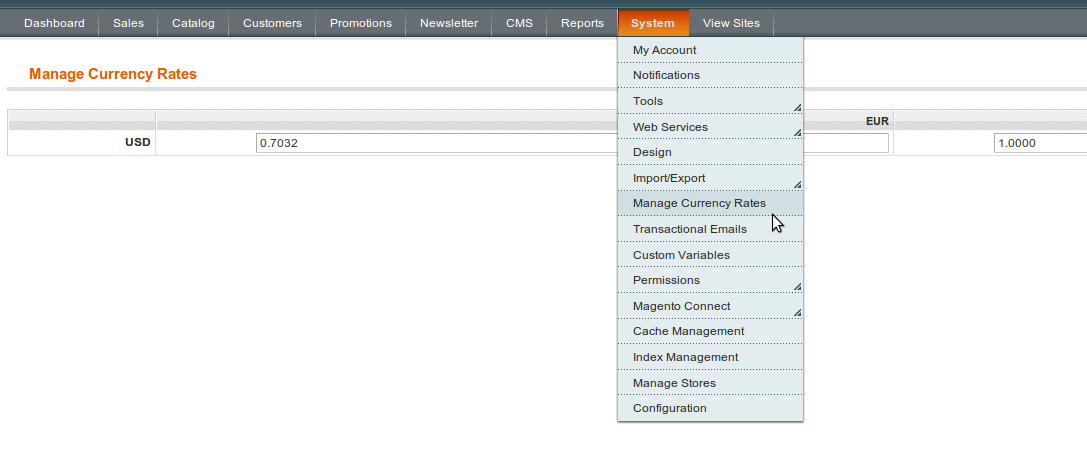
After that you should go to menu item under “System->Manage Currency Rates”. And set rates between values you’ve chosen before. And here’s how it looks like:

And now, after you’re done with initial setup, let’s go with modifications to make output in header happen. First thing you should do is to create new template file and put it here
Next thing you need to do is to display this custom currency template inside header. I’ve inserted one line inside “YOUR_PACKAGE/YOUR_THEME/layout/page.xml” as follows (as base for this article I’ve used Magento CE “Modern” theme):
Here’s a screenshot of how it looks:
After that you should go to menu item under “System->Manage Currency Rates”. And set rates between values you’ve chosen before. And here’s how it looks like:
And now, after you’re done with initial setup, let’s go with modifications to make output in header happen. First thing you should do is to create new template file and put it here
Next thing you need to do is to display this custom currency template inside header. I’ve inserted one line inside “YOUR_PACKAGE/YOUR_THEME/layout/page.xml” as follows (as base for this article I’ve used Magento CE “Modern” theme):
<block type="directory/currency" name="store_currency_selector" as="store_currency_selector" template="directory/currency.phtml"/>
And finally there’s one more thing you need to do to inject our custom
template so you can see it on frontend, Open
“YOUR_PACKAGE/YOUR_THEME/template/page/html/header.phtml” (or create new
file if there’s none there) and add yet another line
echo $this->getChildHtml('store_currency_selector') ?>


No comments:
Post a Comment